


In the rapidly evolving world of technology, keeping hardware up to date is essential for corporate success. However, a lot of companies continue to use antiquated technology because they think it would save money or prevent the inconvenience of upgrading. In the short term, this could seem like a cost-effective approach, but utilising outdated hardware can put your company at serious risk for missed productivity and cybersecurity flaws.
We’ll discuss why obsolete gear is a problem, how it might jeopardise your company, and how to reduce the dangers in this blog article.
Why Companies Retain Antiquated Hardware
Before discussing the dangers, let’s look at the reasons why companies frequently continue to use antiquated systems:
Cost Issues: Businesses may put off replacements in order to save money because upgrading hardware can be costly.
Downtime Fears: Operations may be disrupted by the time and effort needed to switch to new systems.
Lack of Knowledge: Some companies believe that their current systems are still sufficient or undervalue the dangers of outdated hardware.
Compatibility problems: Older computers may not be able to run legacy software, which makes upgrades seem unfeasible.
These justifications are reasonable, however depending on outdated gear has considerably more dangers and expenses than it does advantages.
Old Hardware’s Potential Hazards
1. Vulnerabilities in cybersecurity
The vulnerability of old gear to cyberattacks is one of the biggest concerns associated with its use. As technology advances, so do cybercriminals’ strategies. The security elements required to protect against contemporary threats are frequently absent from older systems.
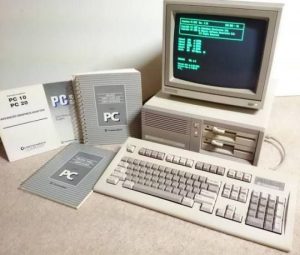
Absence of Support: Over time, manufacturers cease to offer upgrades for outdated gear. These systems are susceptible to ransomware, malware, and other online dangers if security patches are not applied on a regular basis.
Increased Attack Surface: Hackers can easily gain access to your larger network through outdated devices with shoddy defences.
Real-World Example: Thousands of businesses worldwide who had not upgraded their operating systems were impacted by the WannaCry ransomware attack in 2017, which took use of flaws in earlier versions of Windows.
2. Legal and Compliance Risks
Strict laws pertaining to cybersecurity and data protection apply to many businesses. Your company runs the danger of non-compliance when it uses antiquated gear that doesn’t match these standards, which can lead to significant fines and harm to its brand.Regulations such as the General Data Protection Regulation (GDPR), the Health Insurance Portability and Accountability Act (HIPAA), and others mandate that companies take appropriate measures to protect data. These requirements are frequently not met by outdated gear.
Audit Failures: Failure to comply with regulations because of obsolete hardware may result in audits that are unsuccessful, which may affect your ability to conduct business with partners or government organisations.
3. A reduction in output
Employee productivity may be hampered by ageing hardware since it is frequently slower, less dependable, and more likely to malfunction.
System Downtime:
Older equipment is more prone to break down or malfunction, disrupting operations and costing businesses money.
Slow Performance: Employee annoyance and delays result from outdated hardware’s inability to run contemporary applications effectively.
Compatibility problems: Businesses may be forced to use antiquated software that is devoid of essential functions because new software upgrades may not be supported on obsolete platforms.
4. Difficulties with Data Loss and Recovery
Hardware breakdowns are more likely to occur in older hardware since it is more susceptible to physical wear and tear.
Hard Drive Failures: Data corruption and total failure are more likely to occur with ageing storage systems.
Limited Backup Capabilities: It may be more difficult to protect important company data when outdated systems do not support contemporary backup and recovery methods.
Losing data can be disastrous, particularly for small organisations that might not have the means to recover.
5. Inefficient Use of Energy
In addition to being slower, outdated gear uses less energy. Higher electricity bills and a greater carbon impact result from continued reliance on antiquated systems.
Heat and Power: Older equipment produces more heat and uses more energy, which can raise office cooling expenses.
Sustainability Issues: Companies are under more and more pressure to implement environmentally friendly procedures. Relying on antiquated gear goes against sustainability objectives and can damage the reputation of your company.
6. Inability to Use Contemporary Tools
Newer applications and tools need hardware that can support them as technology develops. Adopting cutting-edge solutions like cloud computing, artificial intelligence, or advanced analytics may be hampered by using antiquated technology.
Lost Opportunities: Companies that depend on outdated gear could find it difficult to incorporate new technology that could boost productivity or provide them a competitive advantage.
Client Expectations: Modern tools are expected by customers, and antiquated systems may provide the false impression about the professionalism of your firm.
Old Hardware’s Hidden Costs
Despite the apparent cost savings, keeping outdated hardware frequently results in unanticipated expenses that exceed the cost of upgrading:
Increased Maintenance: The cost of fixing damaged parts and replacing them can go up rapidly.
Lost Revenue: Your bottom line may suffer from downtime brought on by slow systems or hardware malfunctions.
Opportunity Costs: More time may be spent on growth-oriented endeavours rather than repairing outdated systems.
How to Reduce the Dangers of Antiquated Hardware
1. Perform an audit of the hardware
Examine your IT infrastructure on a regular basis to find out which systems are out-of-date and when they should be replaced. Make sure hardware updates happen before performance problems appear by creating a hardware lifetime plan.
2. Use Cloud-Based Solutions
By switching to cloud-based services, reliance on physical hardware is decreased. Cloud solutions are more affordable than on-premises systems because they provide scalability, frequent updates, and improved security.
3. Make Consistent Upgrade Investments
Include a budget for hardware replacements in your long-term IT plan. Over time, purchasing contemporary gear can lower maintenance costs, increase security, and boost productivity.

4. Put backup and recovery plans into action
Make sure that all important data is routinely backed up using dependable, contemporary technologies. Hardware failures should be included in a thorough disaster recovery plan.
5. Employee Training
Inform staff members of the value of utilising safe and modern systems. Additionally, training can assist them in identifying hardware problems and adhering to best practices to preserve performance.
6. Safely Get Rid of Old Hardware
Make sure old hardware is disposed of properly and safely when replacing it. Utilise approved e-waste recycling programs to discard components and erase all sensitive data.
Looking Ahead: IT Infrastructure’s Future
Businesses must continue to be proactive in implementing new tools and systems as technology advances. To reach their full potential, emerging technologies like edge computing, artificial intelligence, and the Internet of Things (IoT) need reliable hardware.
Subscription-Based Models: gear-as-a-service (HaaS) models, in which organisations lease gear with regular upgrades included, are becoming more and more popular.
Sustainability Focus: Energy-efficient hardware and environmentally friendly procedures will probably be given top priority in future IT initiatives.
In conclusion,
Using antiquated gear may appear like a cost-cutting strategy, but it can put your company at serious risk for missed productivity and cybersecurity concerns. You may shield your company from the hidden risks of outdated hardware by routinely inspecting your systems, making plans for updates, and implementing contemporary solutions.
Upgrading your IT infrastructure is an investment in your company’s future, not just in new technology.